Current status of the Ning Platform is always available on the Ning Status Blog.

If you want to call attention to a certain video, you could Feature it. Another way would be to put a colored background behind it. For example, the code below will add a yellow background to the video whose name incudes the words "Magic Town", as seen in this picture:
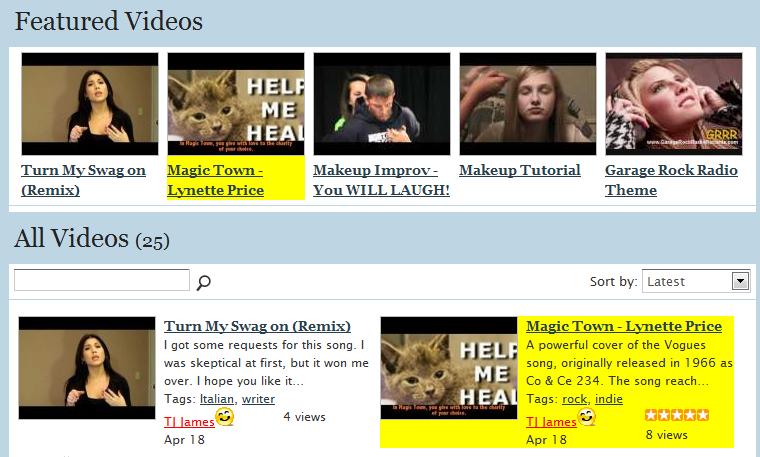


Here is the code:


<script type="text/javascript">

x$('div.xg_list_video').find('a:contains("Magic Town")').parent().parent().parent().css('background-color', 'yellow');

</script>


Paste this into your Custom Code box, then change "Magic Town" to some words in the title of the video you want to highlight on your site, and change 'yellow' to whatever background color you want.


Best wishes!

"TJ"


You need to be a member of Ning Creators Social Network to add comments!

Join Ning Creators Social Network

Votes: 0
Email me when people reply –

Replies

  • NC for Hire

    Excellent tip TJ! Thank you for sharing. I used your idea/tip, and am using similar code to display a VIP icon next to the Group icon for Jen's Premium Ning Tips. Going to send you a pm on what I want to do, on taking this to the next step, and see if you're interested in the project.

    Best,

    Jen

  • Hi Diane and Jen,

    I'm glad you like this tip! smile.gif

    "TJ"


    P.S. I am about to reply to your PM, Jen.

  • Hey, TJ!


    I love this idea! For us non-techie types, can you please tell us where the Custom Code box is? You guys always come up with the coolest changes to make, but I'm clueless as to how to go about it most of the time.


    Thanks for your help!

    Shusara

    • Hello Shusara!

      If you are the Creator of a Network, there should be a small tool icon at the upper left corner of your site.  It looks like a wrench crossed with a screwdriver.  Click that and a menu appears.  The Custom Code choice is about three-quarters of the way down, under Tools.  Or you can reach the same Custom Code page by clicking the Manage menu choice, then click the Analytics icon in the first row of icons, or click Custom Code in the menu down the left side. 

      Once you get to the Custom Code box, its always a good idea to copy what's in there and paste it into a new TXT file using Notepad (on WIndows, there's probably a similar text editor on Macs) - just in case you make a mistake with the code and need to go back to where you were. 

      Best wishes!

      "TJ"


      CustomCode.jpg?width=721

      • I don't seem to have that when I look at my dashboard.  Is this another example of how a ning manager can't see what the Creator sees?  sigh....
        • Hi Deb,

          I don't have any managers or admins on my site, I do it all!  But if I remember correctly, only the NC can access the Custom Code page, so only they see the menu choices and icons I circled above in red.

          Best wishes!

          "TJ"

  • It's cool!!!
  • This didn't work for me?

    And when I went back in to check that I copied the code and made the changes - and it strips out the <script> and </script> lines so all I see is the 2nd line?

    Help?

    • Hi Soleil,

      Did you put the code in the Custom Code box?  It's also known as the Analytics box.  I went to your very nice site, http://yogablaze.ning.com/ - I looked at your Source and I don't see the code in the Custom Code area.

      If you did put it in the Custom Code box and subsequently took it out, I don't know why the Custom Code box would strip out script tags when saved; luckily I have never had that problem.

      Let me know what happens if you try it again.

      Best wishes!

      "TJ"


This reply was deleted.
 

Some interesting articles related to community management, digital marketing etc. could be found in our digest. Don't hesitate to leave a feedback so we would know that we should continue :-)

Latest Activity

Scott Bishop replied to Alex - Rosas † Negras's discussion
HTML Browser Popup Window Generator,possible with a click to have the window open for ning or other pages, this is my example
"Where at in a 3.0 website do you paste the code to? "
yesterday
Scott Bishop replied to George H. Compton IV's discussion
(Ning 2 and 3) welcome / sign-in and sign-up pop-up module. Updated Aug 24, 2017
"Hi George, I'm not sure if this tip has been outdated or for some reason it's not working on my…"
yesterday
Eva updated their profile
Jan 28
Scott Bishop replied to Scott Bishop's discussion
Please Help! Members Have No Way of Posting Anything
"https://community.surfoutlook.com/
However, it's been solved. Ning helped me out with it. "
Jan 27
Alex - Rosas † Negras replied to Scott Bishop's discussion
Please Help! Members Have No Way of Posting Anything
"I don't remember your site, I'll check for you, can I have the link?"
Jan 26
Scott Bishop replied to ⚡JFarrow⌁'s discussion
🖼️ Improve Accessibility & SEO on Your Ning Photo Pages by Automatically Adding ALT Text from Photo Titles
"On your step 3 where you say "Paste in the script below", I'm not finding that. Did you forget to…"
Jan 25
Scott Bishop replied to Scott Bishop's discussion
Please Help! Members Have No Way of Posting Anything
"I think that setting was switched over to Admin as a default when I converted from 2.0 to 3.0…"
Jan 25
Alex - Rosas † Negras replied to Scott Bishop's discussion
Please Help! Members Have No Way of Posting Anything
"settings members must post, if you put ADMIN it is FORBIDDEN TO PEOPLE"
Jan 25
Scott Bishop replied to Scott Bishop's discussion
Please Help! Members Have No Way of Posting Anything
"I got an answer back from Ning Support within an day. It was a setting that somehow slipped out of…"
Jan 22
Scott Bishop posted a discussion
I just realized that my members can no longer post pictures, videos, blogs, events, or anything…
Jan 21
Eva updated their profile
Jan 18
Garfield Archivist replied to ⚡JFarrow⌁'s discussion
The Digital Exodus: Anatomy of a Ning Migration in 2026
"Love that image.  True dat to what you said. We are living in a different time."
Jan 18
More…

Meanwhile, you can check our social media channels